A, Bは正則行列⇔ABは正則行列の証明
行列が正則であることと
が正則であることは同値であることを証明する。
➀十分性
とすると、
\begin{align}
A&=ABB^{-1}=MB^{-1}\\
I&=AA^{-1}=ABB^{-1}A^{-1}=MB^{-1}A^{-1}=MC\\
\end{align}
同様に
\begin{align}
B&=A^{-1}AB=A^{-1}M\\
I&=B^{-1}B=B^{-1}A^{-1}M=CM\\
\end{align}
よってが成り立つので
は正則で、その逆行列は
。
➁必要性
は正則より、逆行列
が存在して
。よって
\begin{align}
I&=MC=AB(AB)^{-1}\\
A^{-1}&=A^{-1}AB(AB)^{-1}=B(AB)^{-1}\\
AA^{-1}&=AB(AB)^{-1}=I\\
\end{align}
また
\begin{align}
I&=CM=(AB)^{-1}AB\\
B^{-1}&=(AB)^{-1}ABB^{-1}=(AB)^{-1}A\\
B^{-1}B&=(AB)^{-1}AB=I\\
\end{align}
したがっては正則。
以上よりが正則であることと
が正則であることが同値であることが示された。
【Python】二重ばね振り子をシミュレーションする
二重ばね振り子の運動方程式をオイラーラグランジュ方程式から導出し、それを基に数値計算を行います。
まずラグランジアンを計算します。図を用意するのが面倒だったので、二重振り子の場合と同様の変数設定をしていると考えてください。ただし質点はばねでつながれていますのでは時間変化します。
運動エネルギーは
\begin{align}
T&=\frac{1}{2}m_1(\dot{x_1}^2+\dot{y_1}^2)+\frac{1}{2}m_2(\dot{x_2}^2+\dot{y_2}^2)\\
&=\frac{1}{2}[m_1[(\dot{l_1}\cos\theta_1-l_1\dot{\theta_1}\sin\theta_1)^2+(\dot{l_1}\sin\theta_1+l_1\dot{\theta_1}\cos\theta_1)^2] \\&+
m_2[(-l_1\dot{\theta_1}\sin\theta_1 - l_2\dot{\theta_2}\sin\theta_2 + \dot{l1}\cos\theta_1 + \dot{l_2}\cos\theta_2)^2 +
(l_1\dot{\theta_1}\cos\theta_1 + l_2\dot{\theta_2}\cos\theta_2 + \dot{l1}\sin\theta_1 + \dot{l_2}\sin\theta_2)^2]]\\
&=\frac{\dot{\theta}_1^{2} l_{1}^{2} m_{1}}{2} + \frac{\dot{\theta}_1^{2} l_{1}^{2} m_{2}}{2} + \dot{\theta}_1 \dot{\theta}_2 l_{1} l_{2} m_{2} \cos{\left(\theta_{1} - \theta_{2} \right)} - \dot{\theta}_1 \dot{l}_2 l_{1} m_{2} \sin{\left(\theta_{1} - \theta_{2} \right)} + \frac{\dot{\theta}_2^{2} l_{2}^{2} m_{2}}{2} + \dot{\theta}_2 \dot{l}_1 l_{2} m_{2} \sin{\left(\theta_{1} - \theta_{2} \right)} + \frac{\dot{l}_1^{2} m_{1}}{2} + \frac{\dot{l}_1^{2} m_{2}}{2} + \dot{l}_1 \dot{l}_2 m_{2} \cos{\left(\theta_{1} - \theta_{2} \right)} + \frac{\dot{l}_2^{2} m_{2}}{2}
\end{align}
ポテンシャルエネルギーは、
\begin{align}
U=-gl_{1} m_{1} \cos{\left(\theta_{1} \right)} - g m_{2} \left(l_{1} \cos{\left(\theta_{1} \right)} + l_{2} \cos{\left(\theta_{2} \right)}\right) + \frac{k_{1} \left(L_{1} - l_{1}\right)^{2}}{2} + \frac{k_{2} \left(L_{2} - l_{2}\right)^{2}}{2}
\end{align}
\begin{align}
\ddot{\theta_1}&=\frac{L_{2} k_{2} \sin{\left(\theta_{1} - \theta_{2} \right)} - 2 \dot{\theta_1} \dot{l_1} m_{1} - g m_{1} \sin{\theta_{1}} - k_{2} l_{2} \sin{\left(\theta_{1} - \theta_{2} \right)}}{l_{1} m_{1}}\\
\ddot{\theta_2}&=\frac{- L_{1} k_{1} \sin{\left(\theta_{1} - \theta_{2} \right)} - 2 \dot{\theta_2} \dot{l_2} m_{1} + k_{1} l_{1} \sin{\left(\theta_{1} - \theta_{2} \right)}}{l_{2} m_{1}}\\
\ddot{l_1}&=\frac{L_{1} k_{1} - L_{2} k_{2} \cos{\left(\theta_{1} - \theta_{2} \right)} + \dot{\theta_1}^{2} l_{1} m_{1} + g m_{1} \cos{\theta_{1}} - k_{1} l_{1} + k_{2} l_{2} \cos{\left(\theta_{1} - \theta_{2} \right)}}{m_{1}}\\
\ddot{l_2}&=- \frac{L_{1} k_{1} \cos{\left(\theta_{1} - \theta_{2} \right)}}{m_{1}} + \frac{L_{2} k_{2}}{m_{2}} + \frac{L_{2} k_{2}}{m_{1}} + \dot{\theta_2}^{2} l_{2} + \frac{k_{1} l_{1} \cos{\left(\theta_{1} - \theta_{2} \right)}}{m_{1}} - \frac{k_{2} l_{2}}{m_{2}} - \frac{k_{2} l_{2}}{m_{1}}
\end{align}
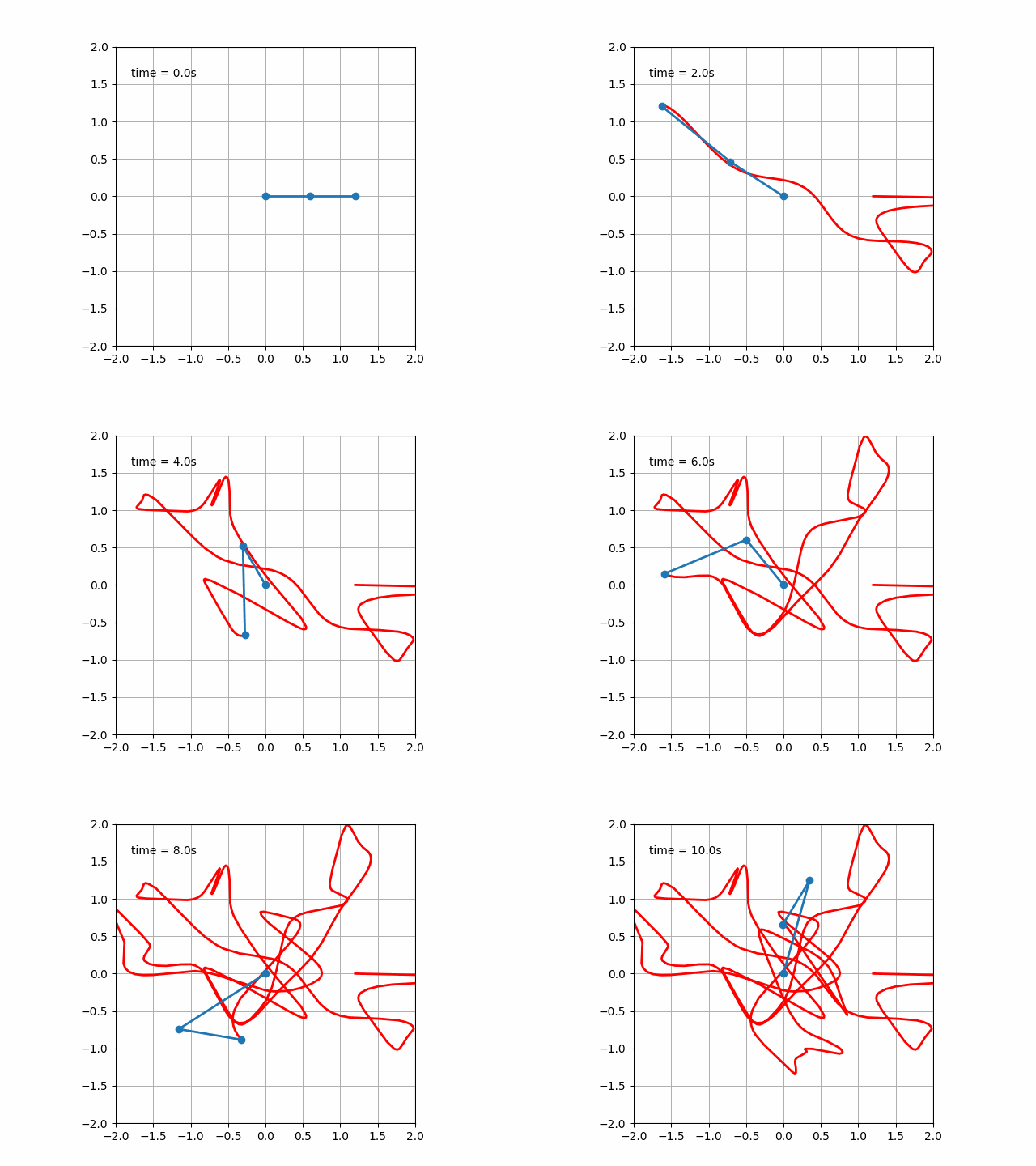
コードを作成して実行すると次のような運動が見られます。
【Python】三体問題をシミュレーションする
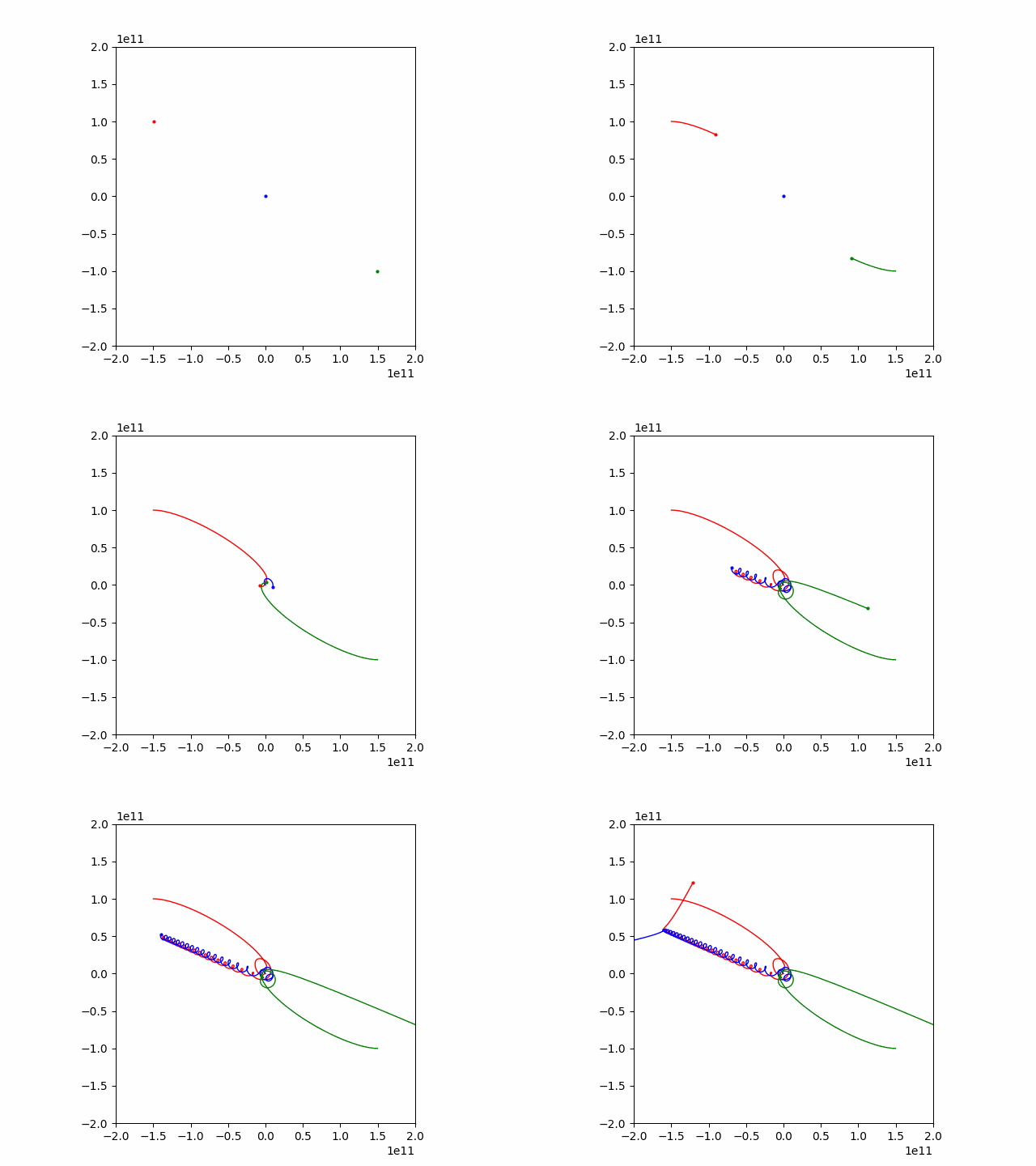
結果
コード
太陽、地球、月と書いてありますが上の結果は太陽でも地球でも月でもありません。
初期条件と書かれたstateの部分には太陽、地球、月のx, y座標およびx, y方向の初期速度が入ります。
import numpy as np
import matplotlib.pyplot as plt
from matplotlib.animation import FuncAnimation
import math

# ルンゲクッタ法
def runge_kutta(h, f, y):
    k1 = h * f(y)
    k2 = h * f(y + k1 / 2)
    k3 = h * f(y + k2 / 2)
    k4 = h * f(y + k3)
    return y + (k1 + 2*k2 + 2*k3 + k4) / 6

# 三体問題の微分方程式
def three_body_equations(t, state):
    G = 6.674e-11  # 重力定数
    m_sun = 2.01e28  # 太陽の質量
    m_earth = 1.4e28#17  # 地球の質量
    m_moon = 2e28  # 月の質量

    x_sun, y_sun, vx_sun, vy_sun, x_earth, y_earth, vx_earth, vy_earth, x_moon, y_moon, vx_moon, vy_moon = state

    r_se = np.sqrt((x_earth - x_sun)**2 + (y_earth - y_sun)**2)
    r_sm = np.sqrt((x_moon - x_sun)**2 + (y_moon - y_sun)**2)
    r_me = np.sqrt((x_moon - x_earth)**2 + (y_moon - y_earth)**2)

    ax_sun = G * m_earth * (x_earth - x_sun) / r_se**3 + G * m_moon * (x_moon - x_sun) / r_sm**3
    ay_sun = G * m_earth * (y_earth - y_sun) / r_se**3 + G * m_moon * (y_moon - y_sun) / r_sm**3

    ax_earth = G * m_sun * (x_sun - x_earth) / r_se**3 + G * m_moon * (x_moon - x_earth) / r_me**3
    ay_earth = G * m_sun * (y_sun - y_earth) / r_se**3 + G * m_moon * (y_moon - y_earth) / r_me**3

    ax_moon = G * m_sun * (x_sun - x_moon) / r_sm**3 + G * m_earth * (x_earth - x_moon) / r_me**3
    ay_moon = G * m_sun * (y_sun - y_moon) / r_sm**3 + G * m_earth * (y_earth - y_moon) / r_me**3

    return np.array([vx_sun, vy_sun, ax_sun, ay_sun, vx_earth, vy_earth, ax_earth, ay_earth, vx_moon, vy_moon, ax_moon, ay_moon])

# アニメーションの初期化
def init():
    sun.set_data([], [])
    earth.set_data([], [])
    moon.set_data([], [])
    sun_traj.set_data([], [])
    earth_traj.set_data([], [])
    moon_traj.set_data([], [])
    return sun, earth, moon, sun_traj, earth_traj, moon_traj

# アニメーションの更新
def update(frame):
    global state
    state = runge_kutta(dt, lambda y: three_body_equations(0, y), state)

    sun.set_data(state[0], state[1])
    earth.set_data(state[4], state[5])
    moon.set_data(state[8], state[9])

    sun_traj.set_data(np.append(sun_traj.get_xdata(), state[0]),
                      np.append(sun_traj.get_ydata(), state[1]))

    earth_traj.set_data(np.append(earth_traj.get_xdata(), state[4]),
                        np.append(earth_traj.get_ydata(), state[5]))

    moon_traj.set_data(np.append(moon_traj.get_xdata(), state[8]),
                       np.append(moon_traj.get_ydata(), state[9]))

    return sun, earth, moon, sun_traj, earth_traj, moon_traj

# 初期条件
state = np.array([-1.5e11, 1.0e11, 1.0e3, 0.0e3, 0.0e11, 0.0e10, 0, -0.0e3, 1.5e11, -1.0e11, -1.0e3, -0.0e4])


# シミュレーションの設定
dt = 60 * 60 * 24 *2
num_frames = 400*2  # シミュレーションのフレーム数

# グラフの初期化
fig, ax = plt.subplots()
l=2
ax.set_xlim(-l*10**11, l*10**11)
ax.set_ylim(-l*10**11, l*10**11)


sun, = ax.plot([], [], 'o', color='red', markersize=2)
earth, = ax.plot([], [], 'o', color='blue', markersize=2)
moon, = ax.plot([], [], 'o', color='green', markersize=2)

# 軌跡の初期化
sun_traj, = ax.plot([], [], '-', color='red', linewidth=1)
earth_traj, = ax.plot([], [], '-', color='blue', linewidth=1)
moon_traj, = ax.plot([], [], '-', color='green', linewidth=1)

# アニメーションの作成
interval_ms = 2  # アニメーションの描画速度(ミリ秒)
ani = FuncAnimation(fig, update, frames=num_frames, init_func=init, blit=True, interval=interval_ms)


plt.gca().set_aspect('equal', adjustable='box')
# アニメーションの表示
#plt.show()
